要在VBA上畫圖表,一定要懂圖表類型的常數,但是我想台灣人應該習慣用繁體中文的吧!可是用到VBA上,這些常數沒有說明,還真不知是什麼圖表類型,所以我努力的把excel 2003的圖表類型努力的看完了,並且翻譯說明如下,但也突然發現竟然微軟搞錯了一個翻譯,拍照存證如下圖:
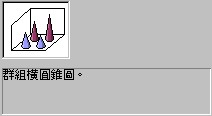
群組橫圓錐圖??這是橫的嗎?不是直的嗎?而且選擇了這個圖形之後,看到的還是直的,所以應該是翻譯錯了!
參閱應用於範例特性
返回或設置圖表類型。XlChartType 類型,可讀寫。
| Name | Value | Description |
|---|---|---|
| xl3DArea | -4098 | 立體區域圖. |
| xl3DAreaStacked | 78 | 立體堆疊區域圖. |
| xl3DAreaStacked100 | 79 | 100%堆疊區域圖. |
| xl3DBarClustered | 60 | 立體群組橫條圖. |
| xl3DBarStacked | 61 | 立體堆疊橫條圖. |
| xl3DBarStacked100 | 62 | 立體100%堆疊橫條圖. |
| xl3DColumn | -4100 | 立體直條圖. |
| xl3DColumnClustered | 54 | 立體群組直條圖. |
| xl3DColumnStacked | 55 | 立體堆疊直條圖. |
| xl3DColumnStacked100 | 56 | 立體100%堆疊直條圖. |
| xl3DLine | -4101 | 立體折線圖. |
| xl3DPie | -4102 | 立體圓形圖. |
| xl3DPieExploded | 70 | 分裂式立體圓形圖. |
| xlArea | 1 | 區域圖 |
| xlAreaStacked | 76 | 堆疊區域圖. |
| xlAreaStacked100 | 77 | 100%堆疊區域圖. |
| xlBarClustered | 57 | 群組橫條圖. |
| xlBarOfPie | 71 | 圓形圖帶有子橫條圖. |
| xlBarStacked | 58 | 堆疊橫條圖. |
| xlBarStacked100 | 59 | 100%堆疊橫條圖. |
| xlBubble | 15 | 泡泡圖. |
| xlBubble3DEffect | 87 | 立體泡泡圖. |
| xlColumnClustered | 51 | 群組直條圖. |
| xlColumnStacked | 52 | 堆疊直條圖. |
| xlColumnStacked100 | 53 | 100%堆疊直條圖. |
| xlConeBarClustered | 102 | 群組橫圓錐圖. |
| xlConeBarStacked | 103 | 堆疊橫圓錐圖. |
| xlConeBarStacked100 | 104 | 100%堆疊橫圓錐圖. |
| xlConeCol | 105 | 立體直圓錐圖. |
| xlConeColClustered | 99 | 群組直圓錐圖. |
| xlConeColStacked | 100 | 堆疊直圓錐圖. |
| xlConeColStacked100 | 101 | 100%堆疊直圓錐圖. |
| xlCylinderBarClustered | 95 | 群組橫圓柱圖. |
| xlCylinderBarStacked | 96 | 堆疊橫圓柱圖. |
| xlCylinderBarStacked100 | 97 | 100%堆疊橫圓柱圖. |
| xlCylinderCol | 98 | 立體直圓柱圖. |
| xlCylinderColClustered | 92 | 群組直圓柱圖. |
| xlCylinderColStacked | 93 | 堆疊直圓柱圖. |
| xlCylinderColStacked100 | 94 | 100%堆疊直圓柱圖. |
| xlDoughnut | -4120 | 環圈圖. |
| xlDoughnutExploded | 80 | 分裂式環圈圖. |
| xlLine | 4 | 折線圖. |
| xlLineMarkers | 65 | 含有資料標記的折線圖. |
| xlLineMarkersStacked | 66 | 含有資料標記的堆疊折線圖. |
| xlLineMarkersStacked100 | 67 | 含有資料標記的100%堆疊折線圖. |
| xlLineStacked | 63 | 堆疊折線圖. |
| xlLineStacked100 | 64 | 100%堆疊折線圖. |
| xlPie | 5 | 圓形圖. |
| xlPieExploded | 69 | 分裂式圓形圖. |
| xlPieOfPie | 68 | 子母圓形圖. |
| xlPyramidBarClustered | 109 | 群組橫圓錐圖. |
| xlPyramidBarStacked | 110 | 堆疊橫圓錐圖. |
| xlPyramidBarStacked100 | 111 | 100%堆疊橫圓錐圖. |
| xlPyramidCol | 112 | 立體直圓錐圖. |
| xlPyramidColClustered | 106 | 群組直圓錐圖. |
| xlPyramidColStacked | 107 | 堆疊直圓錐圖. |
| xlPyramidColStacked100 | 108 | 100%堆疊直圓錐圖. |
| xlRadar | -4151 | 雷達圖. |
| xlRadarFilled | 82 | 填滿式雷達圖. |
| xlRadarMarkers | 81 | 帶有資料標記的雷達圖. |
| xlStockHLC | 88 | 最高-最低-收盤. |
| xlStockOHLC | 89 | 開盤-最高-最低-收盤. |
| xlStockVHLC | 90 | 成交量-最高-最低-收盤. |
| xlStockVOHLC | 91 | 成交量-開盤-最高-最低-收盤. |
| xlSurface | 83 | 立體曲面圖. |
| xlSurfaceTopView | 85 | 曲面圖 (俯視). |
| xlSurfaceTopViewWireframe | 86 | 曲面圖 (俯視、只顯示線條). |
| xlSurfaceWireframe | 84 | 立體曲面圖(只顯示線條). |
| xlXYScatter | -4169 | 散佈圖. |
| xlXYScatterLines | 74 | 帶有折線的XY散佈圖. |
| xlXYScatterLinesNoMarkers | 75 | 帶有折線但沒有資料標記的XY散佈圖. |
| xlXYScatterSmooth | 72 | 帶有平滑線的XY散佈圖. |
| xlXYScatterSmoothNoMarkers | 73 | 帶有平滑線但沒有資料標記的XY散佈圖 |
expression ChartType
expression 必需。該運算式返回“應用於”列表中的物件之一。
說明
某些圖表類型對資料透視圖報表無效。
範例
當圖表為二維氣泡圖時,本示例將第一個圖表組中的氣泡大小設置為默認大小的 200%。
With Worksheets(1).ChartObjects(1).Chart
    If .ChartType = xlBubble Then
        .ChartGroups(1).BubbleScale = 200
    End If
End With
在麻辣家族討論區,有一個問題是如何應用 VBA 將股票圖完整的呈現出來?
各位有空可以留言看看問題如何解決,謝謝。
With ActiveChart
        .SetSourceData Source:=Range("統計圖表!$B$1:統計圖表!$B$" & totalRows & ", 統計圖表!$C$1:統計圖表!$F$" & totalRows)
        '.SetSourceData Source:=Range(" 統計圖表!$C$1:統計圖表!$F$" & totalRows)
        ' .ChartType = xlStockVOHLC              ' 股票圖   ( 會造成 記憶體不足 )
        .ChartType = xlStockOHLC                 ' 股票圖
        .SeriesCollection(1).AxisGroup = 1  ' ****************************************************************************************

        .SeriesCollection.Add Source:=Range("統計圖表!$H$1:統計圖表!$J$" & totalRows)
        .SeriesCollection(5).Name = "=統計圖表!$H$1"
        .SeriesCollection(5).ChartType = xlLine
        .SeriesCollection(6).Name = "=統計圖表!$I$1"
        .SeriesCollection(6).ChartType = xlLine
        .SeriesCollection(7).Name = "=統計圖表!$J$1"
        .SeriesCollection(7).ChartType = xlLine
        ' .SeriesCollection(2).AxisGroup = 1 '****************************************************************************************

        With .ChartGroups(1)
             .UpBars.Format.Fill.ForeColor.RGB = RGB(255, 0, 0)
             .DownBars.Format.Fill.ForeColor.RGB = RGB(0, 32, 96)
        End With


        .SeriesCollection.Add Source:=Range("統計圖表!$G$1:統計圖表!$G$" & totalRows)
        .SeriesCollection(8).Name = "=統計圖表!$G$1"
        .SeriesCollection(8).ChartType = xlColumnClustered
        .SeriesCollection(8).AxisGroup = 2 '****************************************************************************************

        ' With .ChartGroups(2)      '注意, ChartGroup在插入成交量直條後變成 2 了
        '     .UpBars.Interior.Color = RGB(255, 0, 0)
        '     .DownBars.Interior.Color = RGB(0, 32, 96)
        ' End With


        .Axes(xlCategory).CategoryType = xlCategoryScale
        .Axes(xlCategory).TickLabels.NumberFormatLocal = "hh:mm"
        .Axes(xlCategory).MajorTickMark = xlNone
        .Axes(xlCategory).TickLabelPosition = xlLow

        .Axes(xlValue).TickLabels.NumberFormatLocal = "0_ "                     ' 代表物件的格式代碼。

    End With
1 則留言