在JSNWORK的jQuery ui – datepicker 日期使用繁體中文或各國語言提到在官方的 github 找到 https://github.com/jquery/jquery-ui/tree/master/ui/i18n 裡面有一隻 datepicker-zh-TW.js 下載下來,這樣預設的英文datepicker就可以替換為顯示中文
<link href=”jquery-ui-1.11.2/jquery-ui.min.css” rel=”stylesheet” >
<link href=”jquery-ui-1.11.2/jquery-ui.theme.min.css” rel=”stylesheet” >
<script src=”jquery-1.11.1.min.js”></script>
<script src=”jquery-ui-1.11.2/jquery-ui.min.js”></script>
<script src=”jquery-ui-1.11.2/datepicker-zh-TW.js”></script><!– 繁體中文 –>
<script src=”jquery-ui-1.11.2/datepicker-ko.js”></script><!– 韓語 –>
如果同時存在多種語言,jQuery UI 會採用你引用語言的最後一筆,如上述會採用韓語。如果要手動指定,參考官網寫法 ,可以添加這句描述
// 陣列regional內的字串填寫你要的語言, 如繁體中文
$.datepicker.setDefaults( $.datepicker.regional[ “zh-TW” ] );
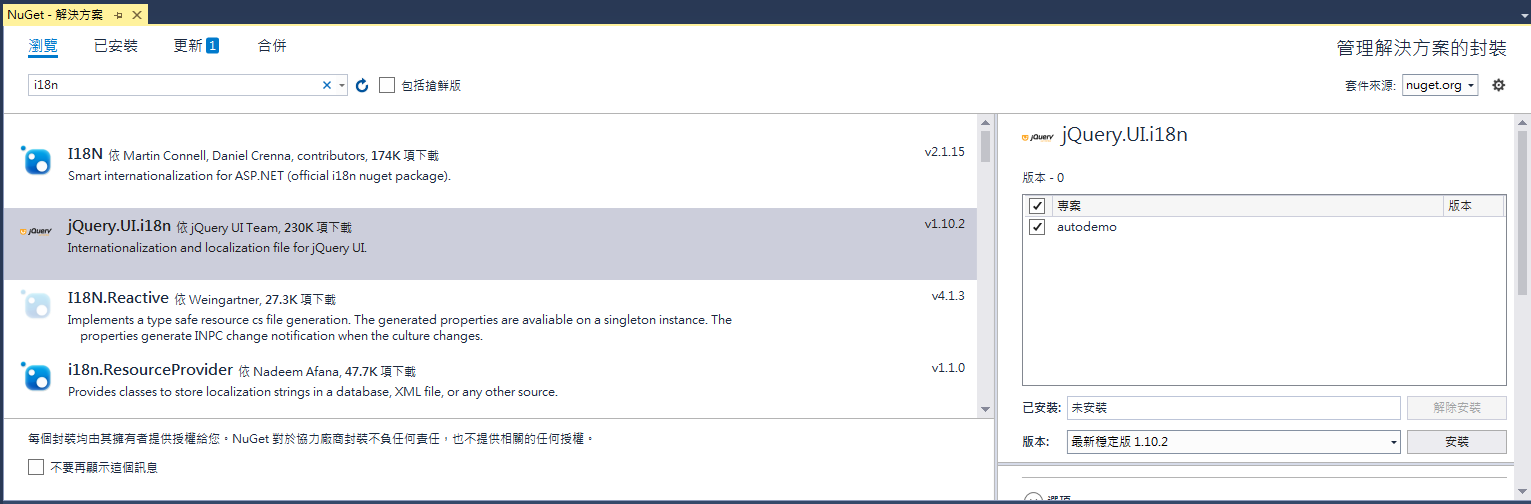
如果是使用微軟的Visual Studio 2017的話,就更方便,也比較推薦使用這個方式,從Visual Studio 2017開發工具「工具(T)」-「NuGet套件管理員(N)」-「套件管理器主控台(O)」開啟「管理方案的NuGet套件(N)」視窗,在「搜尋(Ctrl+L)欄位」輸入「i18n」查詢找到「jQuery.UI.i18n」這個套件,按「安裝」按鈕就可以安裝最新穩定版1.10.2版了。
簡單分享範例:
<!DOCTYPE html>

<html>

<head>

    <meta charset="utf-8" />

    <title></title>

    <link href="Content/themes/base/all.css" rel="stylesheet" />

</head>

<body>

    <input type="text" name="myInput" id="mydate" />

    <script src="Scripts/jquery-3.4.1.js"></script>

    <script src="Scripts/jquery-ui-1.12.1.js"></script>

    <script src="Scripts/jquery-ui-i18n.js"></script>

    <script>

        $(function () {

            //設定中文語系

            $.datepicker.regional['zh-TW'] = {

                dayNames: ["星期日", "星期一", "星期二", "星期三", "星期四", "星期五", "星期六"],

                dayNamesMin: ["日", "一", "二", "三", "四", "五", "六"],

                monthNames: ["一月", "二月", "三月", "四月", "五月", "六月", "七月", "八月", "九月", "十月", "十一月", "十二月"],

                monthNamesShort: ["一月", "二月", "三月", "四月", "五月", "六月", "七月", "八月", "九月", "十月", "十一月", "十二月"],

                prevText: "上月",

                nextText: "次月",

                weekHeader: "週"

            };

            //將預設語系設定為中文

            $.datepicker.setDefaults($.datepicker.regional["zh-TW"]);

            $(function () {

                $("#mydate").datepicker({ dateFormat: 'yy-mm-dd' });

            });

        });

    </script>

</body>

</html>
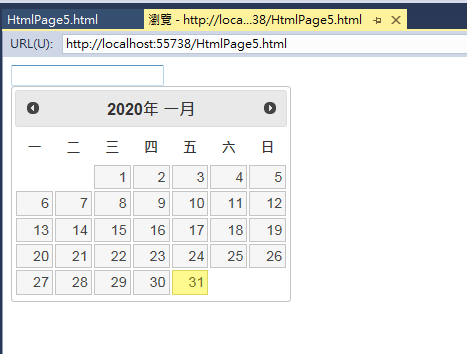
jQuery ui datepicker 範例圖示:
※jQuery UI更新至 jQuery UI 1.13.0
1 則留言