今天在使用Google的網站管理員工具有一個Google研究室,裡頭有一個”網站效能”這個分析,點進去看ㄚ琪琪的家跟工作達人這兩個web所在的網站伺服器是最近剛買的Dell入門級伺服器,它分析後給我page speed 建議:

我一直以為gzip壓縮功能是apache內建的,看起來好像不是,Google到啟用Apache2 的mod_deflate(gzip)來壓縮網頁提高傳輸效能跟How To Save Traffic With Apache2’s mod_deflate,在Ubuntu下簡單的指令:
a2enmod deflate
修改/etc/apache2/mods-available/deflate.conf
改成
<ifmodule mod_deflate.c>
DeflateCompressionLevel 9
AddOutputFilterByType DEFLATE text/html text/plain text/xml application/x-httpd-php
AddOutputFilter DEFLATE js css
</ifmodule>
重新啟動:
/etc/init.d/apache2 restart
用這個網站Check HTTP Compression來檢查:
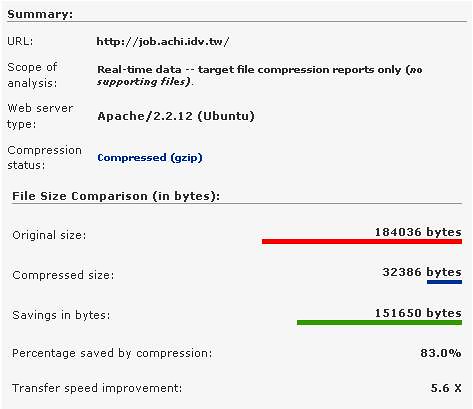
Cool喔!節省了83%喔!看來網站效能提高不少,後續再陸續追蹤網站效能看看!
1 則留言